

Laser vs. Inkjet: Choosing the Right Printer for Your Office
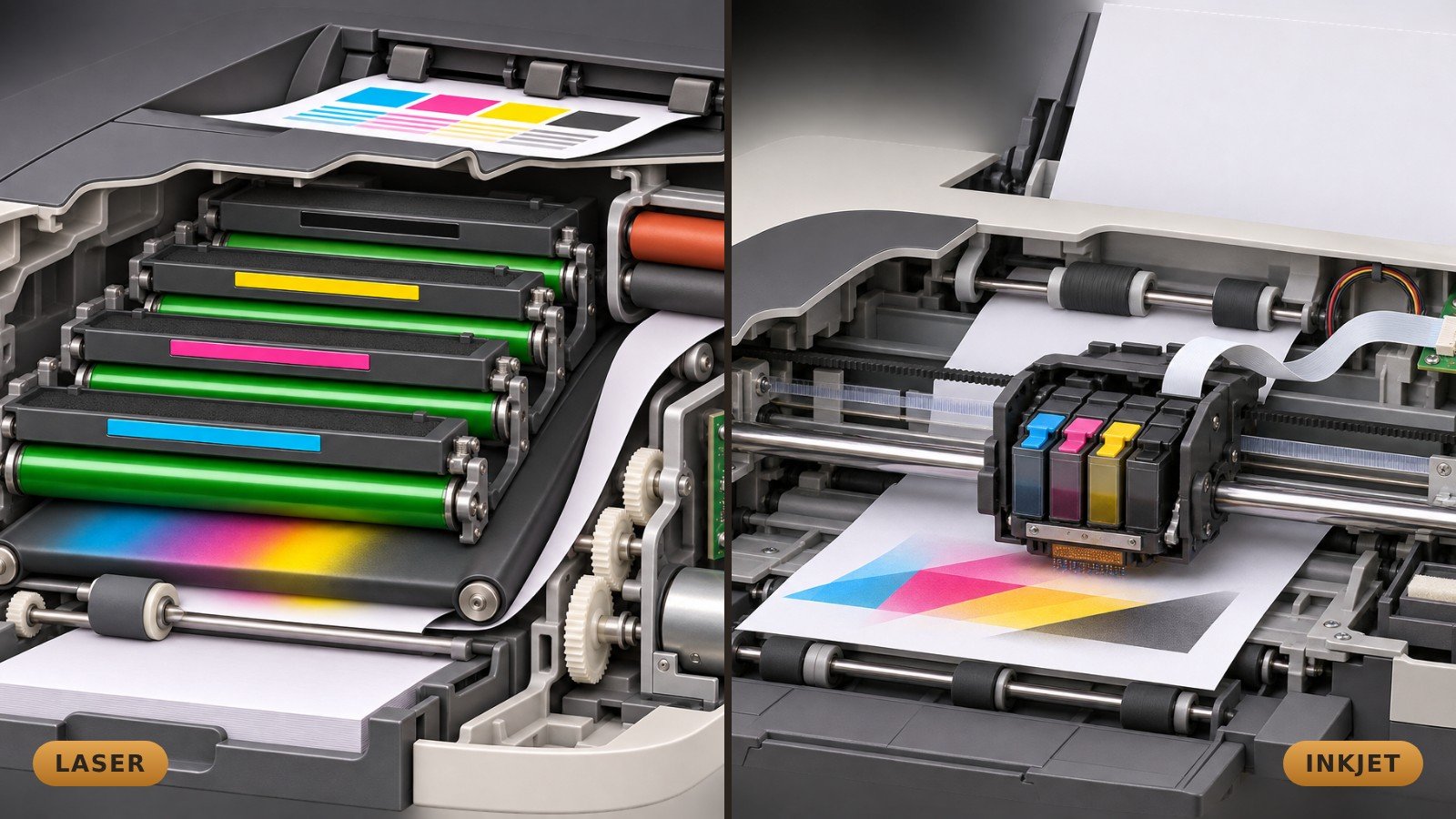
Most offices don't think about their printer until it jams, runs out of ink at the worst moment, or the replacement cartridges cost more than expected. Yet choosing between a laser and an inkjet printer can make a real difference to your monthly costs and how smoothly your day runs.
The two types put words and pictures on paper in completely different ways. Once you understand how each one works, it's much easier to pick the right one for your office.
How a color laser printer works
A laser printer doesn't use ink at all. It uses toner, a very fine dry powder. Here's what happens when you click Print on a typical color laser:
- The printer splits your page into four color patterns: cyan, magenta, yellow and black.
- Each color has its own imaging drum, a cylinder with an electrical charge. A laser beam changes the charge on the drum to "draw" that color's part of the page.
- Each drum picks up its toner only where the laser drew. The four images line up on a transfer belt.
- An electric field moves the combined image from the belt onto the sheet of paper.
- The fuser, a pair of heated rollers, applies heat and pressure that melt the toner into the paper. That's why pages come out warm.
- Cleaners remove leftover toner, and the drums and belt get ready for the next page.
How an inkjet printer works
An inkjet printer builds the page with tiny drops of liquid ink, placed directly on the paper:
- The printer works out where every dot of ink should go.
- Rollers pull in one sheet and position it under the printhead.
- In the most common design, a small motor and belt move the printhead back and forth across the sheet.
- Tiny nozzles fire drops of ink onto the paper. Some printheads use a tiny heater that makes a vapor bubble to push the ink out. Others use a part that flexes electrically, a design called piezoelectric.
- The paper moves forward in small steps, and each pass adds more dots until the page is complete.
- The ink soaks in or dries, and the rollers deliver the finished page.
When the printer isn't in use, a capping and cleaning station covers the printhead to keep the nozzles from drying out.
The real cost is in the ink and toner
The price on the box is only the start. Over a few years of steady printing, the ink or toner you buy for many printers adds up to more than the printer itself. The number to look at is the cost per page: the price of a replacement cartridge, bottle or toner divided by the number of pages it prints.
There are three common choices:
- Cartridge inkjets are usually the cheapest to buy, but replacement cartridges hold little ink. If you print a lot, they can become the most expensive option over time.
- Ink tank inkjets cost more up front, but you refill them from bottles. Their cost per page is typically far lower than cartridges, especially for color.
- Color laser printers usually cost more up front and toner isn't cheap, but each cartridge prints thousands of pages. They're built for steady, higher-volume document printing.
Before you buy, look up the price and page yield of the replacement supplies, not just the printer. It's also worth thinking about how many pages you print each month and how much of it is in color.
How long will it last?
Many businesses plan on about five years for a printer, though a range of three to seven years is common, depending on use and care. Each type wears in its own way:
- Laser: Dry toner doesn't dry out when the printer sits idle, which makes lasers a good fit for offices that print in batches. Rollers, drums, the transfer belt and the fuser still wear over time.
- Cartridge inkjet: The printhead needs regular use. Long idle periods can lead to clogged nozzles and extra cleaning cycles that use up ink. A low purchase price can also make a major repair not worth doing.
- Ink tank inkjet: Cheap refills keep running costs low, but the printhead, rollers and the box that collects waste ink still need attention.
Which one fits your office?
A laser is often best for fast batches of documents and long gaps between print jobs. A cartridge inkjet suits light, regular printing on a small budget. An ink tank inkjet shines when you print color regularly and want low running costs.
Whatever you choose, connect the printer to your network properly, keep its software up to date, and change the default admin password. Office printers are network devices too.
We can help
GNTI has been helping businesses in King, Pierce and Kitsap counties with their technology since 1999. We can help you weigh up the options, set up and connect a printer to your network, and sort out problems when it misbehaves.
Learn more about our Computer Repairs & IT Support services, or contact us to talk about the right printer for your office. Call Seattle at 206.569.4684, Tacoma at 253.267.6727, or email support@gnti.com.
Need help today?
Call the office nearest you, or send us a message and a technician will get back to you.